Shutting off a home gas valve from a phone instead of walking to it
A personal project from mid-2025, before UrgeGas: an Android app that reads a Tuya-linked gas sensor and opens or closes a smart valve through signed cloud API calls, plus a Python service that sends the valve command and a push alert when the alarm fires.
The problem
When gas leaks at home, someone has to walk to the shut-off valve and close it by hand. I wanted to read the gas sensor and switch the valve from my phone. I also wanted the alarm to send the valve command without anyone opening the app. Both devices were linked to Tuya Cloud, so every read and every command had to go through Tuya's API, which requires a signature on each request. I built this alone in June and July 2025, before I started at UrgeGas in August 2025, to learn IoT integration end to end.
What I built
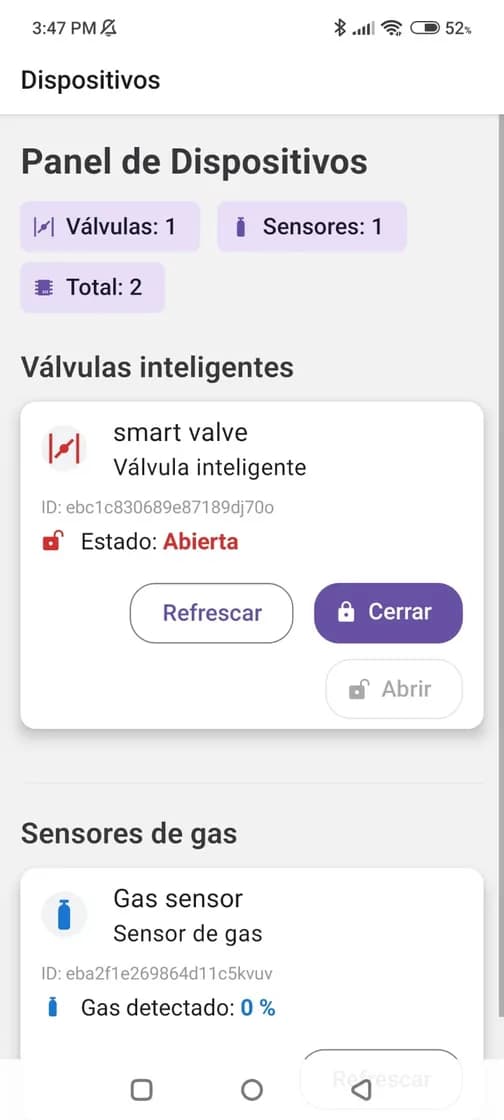
- An Android app in React Native with Expo. It lists the linked devices and shows the gas sensor's current reading.
- Buttons to open or close the valve, with an in-progress state on screen while the command runs.
- Signed calls to the Tuya Cloud API. Every request carries an HMAC-SHA256 signature.
- A small Python service on Uvicorn that polls the sensor through the Tuya API. When the alarm condition fires, it sends the valve command and then a push alert.
- An installable Android APK, version 1.0.0, with one sensor and one valve linked in the app.
Screens
Linked gas sensor and smart valve, with their live state. The gas detector used in the test setup. Devices registered in the Tuya IoT platform the app talks to (account email blurred). A page from the user guide I wrote for the app.
How it works
The app and the Python service are separate clients of the same Tuya Cloud API. The service requests an access token, reads the sensor's status and sends a command to the valve's switch.
The alarm path does not depend on the phone. The service checks the sensor on a loop instead of waiting for an incoming webhook. When a reading meets the alarm condition, it sends the switch command to the valve first and the push notification second.
On July 31, 2025, I tested the chain with a forced alarm while the sensor read 0 (normal). The log shows 0.72 s from the sensor check to the valve command's response, and the push request returned HTTP 200. That shows the software chain works from reading to push. It was a test, not the detection of a real leak.
Results
- 0.72 s
- Sensor check to valve command response, in a forced test
- v1.0.0
- Installable Android APK
Who else worked on it
The gas sensor and the smart valve are off-the-shelf devices, and the cloud API is Tuya's. I wrote the app and the Python service.
Full stack
React Native, Expo, Android, Tuya Cloud API, HMAC-SHA256, Python, Uvicorn